Away mode lowers heating and cooling to energy-saving setpoints whenever the house is empty, then returns to comfort settings once someone’s back.. Use plain Away for short absences of a day or two. Switch to Vacation mode for anything longer than a few days, since it locks in a fixed schedule instead of relying on your phone's location. Set up correctly, it cuts wasted energy and gives you an early warning system against humidity, frozen pipes, and other damage that creeps in while nobody's watching the house.
TL;DR:
- Geofencing can trigger false Away mode if household members' phones are not set to "always allow" location permissions or if sensors mistakenly detect movement.
- Vacation mode often runs on a fixed schedule without preconditioning, risking high humidity, frozen pipes, or uncomfortable arrival temperatures if not properly managed.
- Combining multiple occupancy signals, such as geofence and sensors, improves reliability and minimizes false triggers, especially in households with irregular routines.
- Maintaining recommended temperature ranges during extended absences, such as 55-60°F in winter and 78-88°F in summer, protects pipes and prevents mold without unnecessary energy waste.
- Implementing humidity controls alongside temperature management is crucial, as humidity buildup causes long-term damage even when temperature swings are minimal.
Table of Contents
- What Triggers Smart Thermostat Away Mode?
- How Do You Set Up Smart Thermostat Away Mode?
- What Temperature Should You Set for Away Mode?
- Vacation Mode: Where Extended Absences Go Wrong
- Fixing False Away Alerts and Stuck Vacation Modes
- Advanced Setup: Combining Sensors and Automations
- Why Absentee Owners Should Take Away Settings Seriously
- The Overrated Feature and the One Nobody Sets Up
- When a Managed Concierge Service Beats DIY Monitoring
- Sources
- FAQ
What Triggers Smart Thermostat Away Mode?
Smart thermostats decide you're gone using one of two methods, sometimes both at once. Geofencing tracks your phone's GPS location and switches the system to Away once you cross a set radius around the house. Occupancy sensing relies on onboard motion radar or remote sensors placed around rooms, watching for activity rather than location.
Honeywell's documentation on Auto-Away scheduling explains that motion sensing can actually override geofence status on devices with built-in radar. If the thermostat sees movement, it will hold off on switching to Away even if your phone says you left. That's a feature, not a glitch. It means a houseguest or a pet sitter won't trigger uncomfortable temperatures the moment you drive off.
Control hierarchy matters too. Vacation or Holiday settings typically sit above both your regular schedule and Away mode, overriding everything until the scheduled end date. In multi-person households, most systems wait for every registered phone to leave before flipping to Away, which explains a lot of the "why didn't it switch" confusion.
- Geofencing uses phone GPS and a radius you set in the app
- Occupancy sensors use onboard or remote motion detection
- Vacation/Holiday modes override both Away and your normal schedule
- Multi-phone households often need every device to leave the geofence
- Built-in delay periods prevent the system from flip-flopping on brief exits
How Do You Set Up Smart Thermostat Away Mode?
Setting thermostat away settings takes about ten minutes the first time, less once you know where the menus live. Here's the sequence that works across most major brands.
- Open your thermostat's app and find the mode selector, usually labeled Home, Away, or Eco.
- Tap Away to switch manually before you leave, or Home to cancel it the moment you're back.
- For trips longer than a couple of days, look for a separate Vacation scheduling screen and enter start and end dates along with target temperatures.
- To enable automatic switching, find the geofencing or Auto-Away setting, grant your phone's location permission, and set the trigger radius, typically somewhere between a quarter mile and a few miles.
- If your thermostat has occupancy sensors, check the sensor priority settings so radar detection and geofencing don't work against each other.
- Test the setup by leaving the geofence radius, waiting the documented delay period (ecobee's Smart Home & Away feature requires specific timing before it switches), then confirming the app shows Away status.
- Walk back into the house and confirm it reverts to Home within a few minutes.
Pro Tip: Test the geofence radius at the exact spot where your daily routine starts, like your driveway or the end of your street, not from across town. A radius that's too small triggers false departures every time you check the mailbox.
What Temperature Should You Set for Away Mode?
Short trips call for modest adjustments, not extremes. Bumping the thermostat five to seven degrees warmer in summer or cooler in winter saves energy without stressing the HVAC system or letting humidity climb too far.
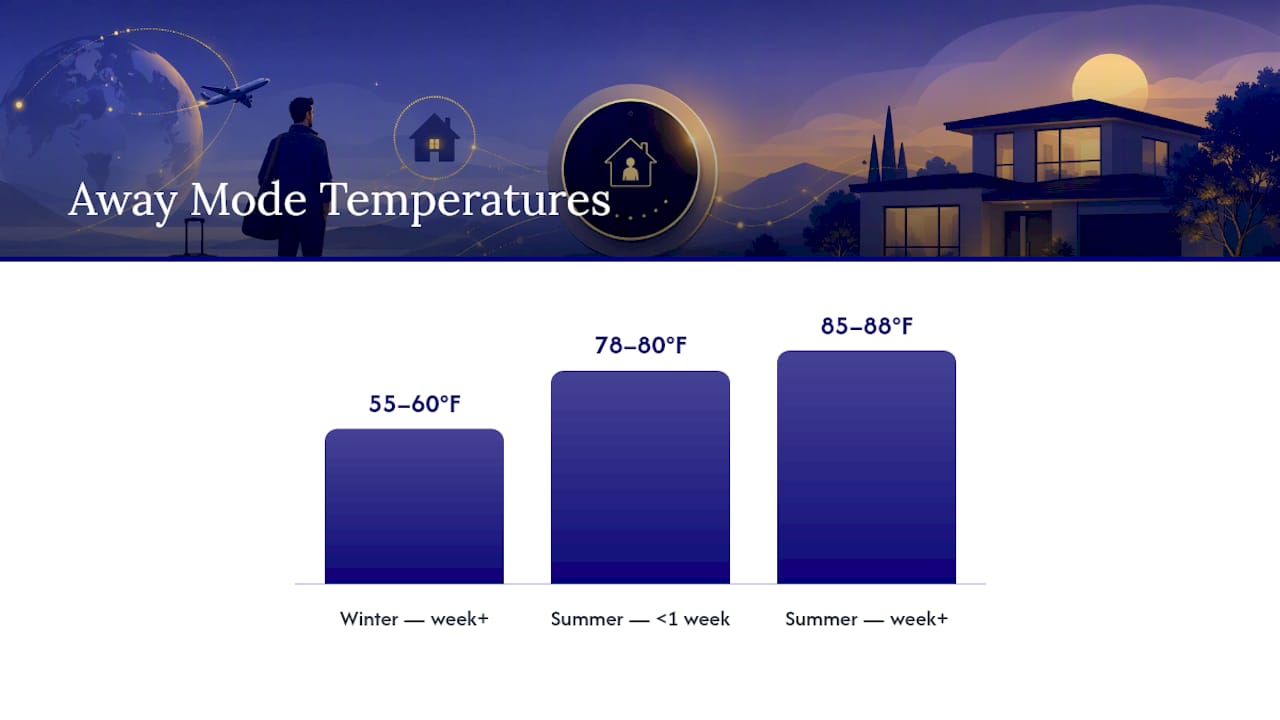
Extended absences are a different calculation entirely. Honeywell's vacation guidance recommends a winter minimum of 55 to 60°F, low enough to save real energy but high enough to keep pipes from freezing. For summer, the guidance splits by trip length: 78 to 80°F for short absences, and 85 to 88°F once you're gone a week or more, provided you're also managing humidity.
- Weekend trips: adjust 5 to 7 degrees from your normal comfort setting
- Winter absences of a week or more: never below 55 to 60°F
- Summer absences under a week: 78 to 80°F
- Summer absences of a week or more: 85 to 88°F with humidity control
- Homes with pets or sensitive furnishings: keep a tighter baseline range regardless of season
Full shutdown, rather than a managed Away or Vacation setpoint, almost always backfires on multi-day trips. It sounds like maximum savings, but it removes the buffer that keeps humidity and freeze risk in check.
Vacation Mode: Where Extended Absences Go Wrong
Vacation and Holiday settings behave differently from everyday Away mode, and that difference catches people off guard. Google Nest's Away behavior shows the system running Eco Temperatures without preheating or precooling before your scheduled return, which means you can walk into a house that's still 85°F if you didn't build in a buffer window.
Vendor vacation features typically disable geofencing entirely and just run the fixed schedule until the end date you entered, sometimes requiring a minimum 24 hour booking through tools like ecobee's vacation scheduler. That rigidity is useful for predictable savings, but it means an early return doesn't automatically fix your comfort.
The real risks on long absences: humidity buildup that invites mold, frozen pipes in cold climates, and that unpreconditioned arrival. Mitigate all three the same way.
- Schedule the return time a few hours before you actually arrive, so preconditioning has time to work
- Use a standalone humidity control device or dehumidifier setting alongside the thermostat
- Build in a mid-trip temperature bump if your system supports remote adjustment
- Arrange a vendor or neighbor check for longer trips, especially in storm season
Fixing False Away Alerts and Stuck Vacation Modes
Most Away mode problems trace back to one of four causes, and you can usually diagnose which one in under five minutes.
- Phone location is disabled or restricted. Check that location services are set to "always allow" for the thermostat app, not just "while using."
- Someone's still home on another registered device. If the system waits for every phone to leave the geofence, one person staying behind keeps the house in Home mode.
- Sensor conflicts. Occupancy sensors and geofencing sometimes disagree; check the sensor priority setting mentioned earlier and adjust which signal wins.
- Firmware or app bugs. Outdated firmware causes more "away mode won't cancel" complaints than any other single factor.
To force-cancel a stuck Away or Vacation setting, go into the app's mode screen and manually select Home, then confirm the change synced to the thermostat itself, not just the app. If it won't budge, reboot the thermostat by cutting power for thirty seconds, then update firmware if a version is available. Persistent HVAC-side issues, like a unit that won't respond to any mode change, usually mean it's time to call in professional HVAC troubleshooting help rather than keep fighting the app.
Advanced Setup: Combining Sensors and Automations
Tech-savvy households get the most reliability by combining presence signals instead of trusting one alone. Google Home's presence-based automations let you blend phone geofencing with speaker and display activity, so the system only calls the house "empty" when multiple signals agree.
- Set sensor priority in your hub so occupancy sensors can veto a false geofence exit
- Pull monthly energy usage reports to confirm Away mode is actually producing savings, then tune setpoints if it isn't
- Test any new automation with every household member's phone before trusting it unattended
Pro Tip: Run a one-week trial with notifications turned on before you fully automate anything. You'll catch the edge cases, like a family member who leaves their phone in the car, before they cause a real problem.
Why Absentee Owners Should Take Away Settings Seriously
For a home that sits empty for weeks at a stretch, correct Away and Vacation settings function as preventive maintenance, not just a utility bill line item. Humidity control, freeze protection, and storm readiness all hinge on setpoints someone actually checked, not defaults left untouched since installation. A workable routine for absentee owners pairs those settings with scheduled remote checks, digital logs, and a standing trigger to dispatch a vendor the moment a reading looks off. That combination of monitoring and response is exactly what a well-run absentee owner security plan is built around, and it's worth treating your thermostat as one sensor in that larger system rather than a set-and-forget appliance.
The Overrated Feature and the One Nobody Sets Up
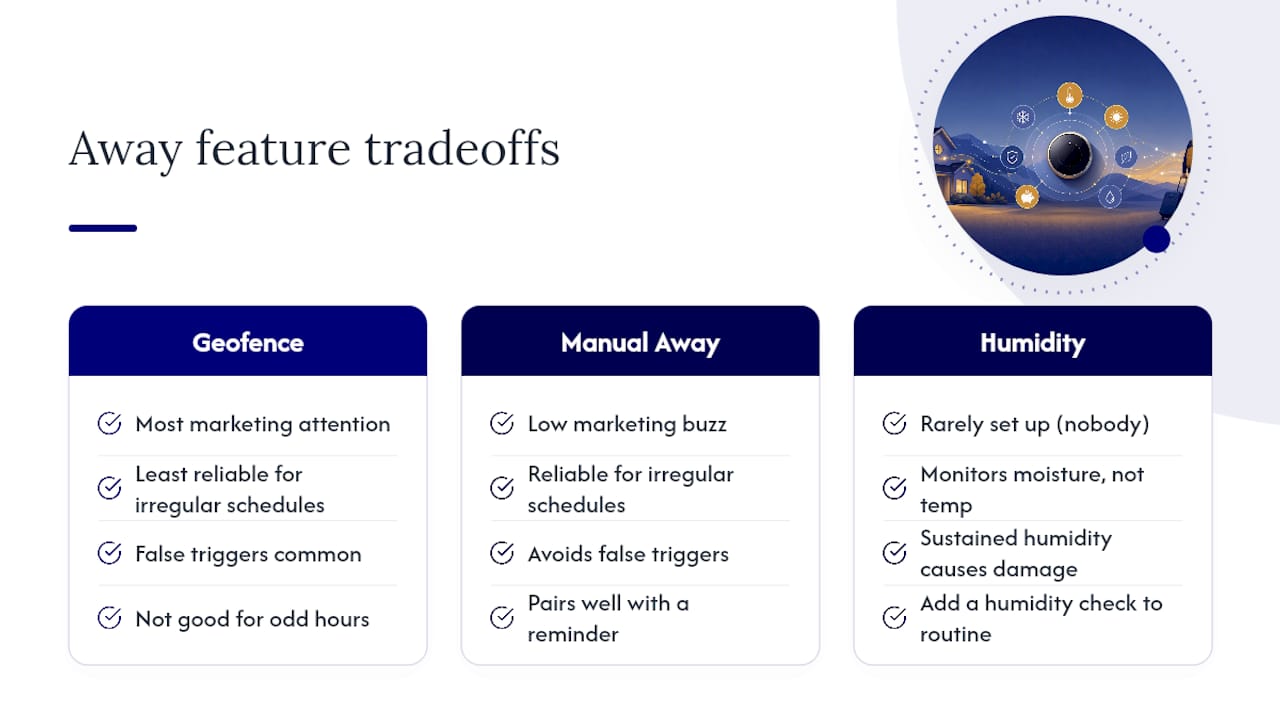
Geofencing gets most of the marketing attention, but it's the least reliable piece of the whole system for anyone with an irregular schedule. A contractor who works odd hours, a retiree who's rarely on a fixed clock, or a household with a dog walker coming and going will fight false triggers constantly. Manual Away, paired with a simple reminder, often beats automation for these households, and there's no shame in choosing the boring, reliable option over the clever one.
What nobody sets up, and should, is the humidity side of the equation. Homeowners obsess over the exact degree they leave the thermostat at for a week-long trip, then ignore the moisture building up in a closed house at 85°F. That's backwards. Temperature swings rarely cause real damage on their own; sustained humidity does, through mold, warped wood, and musty smells that outlast the trip by months. If you only fix one thing after reading this, add a humidity check to whatever monitoring routine you already have for the thermostat itself.
— Zackary
When a Managed Concierge Service Beats DIY Monitoring
A managed concierge service exists for trips where checking an app isn't enough. For extended absences, or in areas where humidity and storms can cause damage from missed setpoints, remote monitoring becomes a necessity.

Concierge teams can layer weekly inspections, remote system checks, and vendor dispatch on top of thermostat automation, so a stuck Vacation mode or a failed sensor gets caught by a person, not just an app notification. Homeowners who travel frequently, split time between multiple properties, or simply want someone accountable for arrival readiness tend to benefit most. If that sounds like your situation, take a look at our Concierge services and get a plan built around how often you're actually away.
Sources
- How to set your thermostat when you're on vacation — Honeywell Home
- Google Nest — Eco Temperatures and Away behavior
- ecobee support — eco+ features: Smart Home & Away
- Scheduling and Auto-Away — Honeywell documentation
FAQ
What temperature should I keep my thermostat at when away?
Keep winter temperatures within a recommended lower range to prevent freezing and summer temperatures moderate to higher levels depending on trip length and humidity management.
What's the difference between Home and Away modes on a smart thermostat?
Home mode holds your regular comfort setpoints, while Away mode switches to energy-saving temperatures once the system detects nobody's inside, based on geofencing, occupancy sensors, or both.
Why does my thermostat say I'm away when I'm home?
Usually it's a geofence radius set too tight, another household phone still registered as "away," or an occupancy sensor that hasn't picked up recent movement; adjusting sensor priority or the geofence radius typically fixes it.
Why does my thermostat think I'm away when I'm actually home?
The most common cause is a phone with location permissions set to "while using" instead of "always," which stops the geofence from updating once the app closes in the background.
How is Vacation mode different from regular Away mode?
Vacation mode runs on a fixed schedule with a set start and end date rather than reacting to your phone's location, and it typically overrides both Away and your normal schedule until it expires.